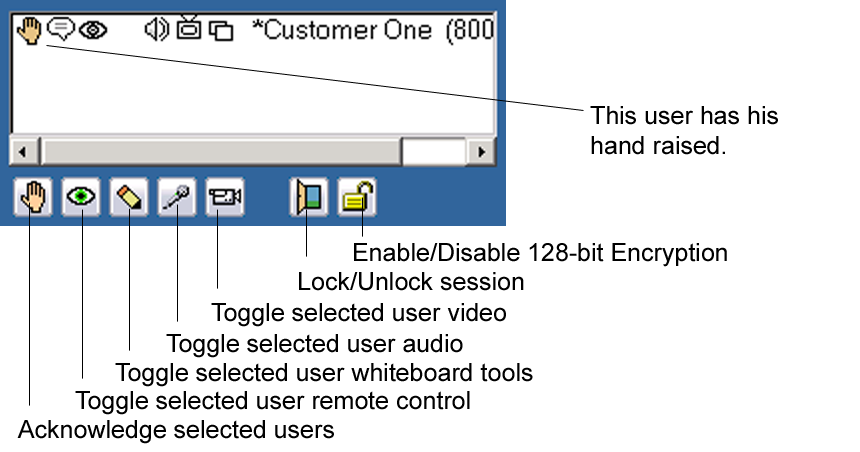
This example of the Attendee List shows one person logged into this meeting with the meeting host. The Attendee List shows all participants attending the meeting. You won’t see your own ID in your Attendee List but your ID will be listed in everyone else’s list.
The buttons below the Attendee List only appear on the host console and it is a fast way for the host to enable or disable the attendee’s access to WebDemo controls such as video, audio(Voice Chat), whiteboard tools or remote control.
The example shown here is from a WebDemo Enterprise host console. If you have a WebDemo Express host console, you would have four buttons (Acknowledge, remote control, whiteboard tools, and Lock). If you have a WebDemo Professional host console you would have five buttons (Acknowledge, remote control, whiteboard tools, audio, and Lock)
If the user has a flag next to their ID it means they have their "hand raised", you click the red flag button to remove the flag icon to acknowledge them.
The example shown is from a WebDemo Enterprise host attendee list.
The 'Door' button LOCKS the session so that no more people can join the meeting. To open a locked meeting, click the 'Closed Door' button .
The icons that appear next to the userid indicate what controls (remote control, keyboard chat, voice chat, or video) are available to that user.